PILOTLOG - CrewLounge AERO
- 3.9
- Rating
- 10.00K
- Installs
- Free
- Price

 Analysis by App-foxy
I approached PILOTLOG - CrewLounge AERO as a working travel companion rather than a flashy aviation novelty. It is a free pilot logbook app from Aviovision, listed in the Travel & Local category, and its purpose is quite focused: helping pilots keep flight records in a digital form instead of relying entirely on paper or scattered notes. That narrow purpose is also its biggest strength. If you regularly need to remember flights, review your history, or keep your aviation information together, the app feels much more relevant than a general travel planner.
My overall impression is positive, but not uncritical. The app has a practical, professional character, and its average rating is 3.9 from over 600 ratings, with more than 10 thousand installs. Those figures suggest a useful but specialized tool rather than an app designed for everyone. I would recommend it to pilots who are willing to spend time setting up a structured logbook. I would be more cautious with someone who wants an effortless, highly visual app that works like a simple notes page.
How the logbook feels to read and navigate
The first thing I noticed is that this is an information-heavy app. A pilot logbook naturally contains many fields, categories, dates, aircraft details, times, and operational notes, so the experience depends less on decoration and more on whether you can find the right piece of information without losing your place. PILOTLOG - CrewLounge AERO is best understood as a structured record system. It rewards users who prefer orderly information and predictable routines.
You May Also Like

 Blood Strike: 2.5 Anniversary
Blood Strike’s Loadouts Turn Every Drop Into a Tactical Gamble
A close look at Blood Strike’s custom loadouts: how fast access to signature weapons reshapes its battle royale rhythm, rewards preparation, and narrows the gap between fights.

 Pandora - Music & Podcasts
Pandora’s Music Is Easy to Start, but Harder to Recover
Pandora’s strength is its low-effort path from a seed to a station. Its weak spot is how much confidence it asks you to place in connection, setup, and quiet recovery.

 8 Ball Pool
8 Ball Pool Is Built on Rivalries, Rematches, and Routine
A close look at the rivalries, rematches, shared routines, and unanswered safety questions that turn a quick pool match into a persistent mobile community.

 Samsung Music
Samsung Music’s Quiet Strength Is Playing What You Already Own
Its reach comes less from spectacle than from dependable access to a personal library. That simplicity is both the app’s strongest retention engine and its ceiling.

 AccuWeather: Weather Radar
AccuWeather Review: A Quick, Clear Forecast for Everyday Decisions
For everyday plans, the best forecast is the one you can understand quickly. AccuWeather makes rain timing, radar, and local conditions easy to act on, with a few trade-offs.

 Hill Climb Racing
Why Hill Climb Racing Still Turns Crashes Into One More Run
A tiny car, a bumpy hill and one more upgrade: Hill Climb Racing keeps resurfacing because its simple chaos makes every near-miss feel personal.
More From Our News Desk
View All News


That structure can be reassuring for experienced pilots. Instead of treating every flight as an isolated note, I found the logbook concept encourages a consistent way of recording activity. Consistency matters when you later need to inspect your history, prepare for a review, or check whether a particular entry was completed correctly. The app makes more sense when I imagine opening it after every flight and following the same short routine, rather than trying to reconstruct several weeks of flying all at once.
The trade-off is that dense aviation information can be tiring to read. A user with reduced vision, reading difficulties, or limited patience for compact forms may need more time than expected. The app is not the sort of tool I would choose for casual browsing. Its value appears when the user is prepared to slow down, read labels carefully, and confirm entries before moving on. I would keep the phone at a comfortable distance and use the device’s own display and text settings where available, but I would not assume that those adjustments remove every usability challenge.
For navigation, I recommend building a personal habit around a few moments: opening the logbook before the flight, recording the essential information soon after landing, and reviewing the entry later when there is no pressure. That approach reduces the chance of trying to remember details while distracted. It also makes the app easier to use for people who find rapid task switching difficult. The strongest accessibility improvement may come from the workflow itself: fewer rushed interactions, fewer corrections, and a clearer mental sequence.
Why the focused design helps some users
Many general note-taking apps are flexible, but that flexibility can become a problem. A blank note gives me freedom, yet it also leaves me responsible for deciding what to write and how to format it. A dedicated pilot logbook provides a stronger framework. For users who benefit from prompts and repetition, that can be easier than inventing a format after every flight.
This is also where the app differs from a basic spreadsheet. A spreadsheet can be customized extensively, but it demands more manual discipline and may become awkward on a phone. PILOTLOG is aimed at the aviation record itself, so the user is not starting from a completely empty grid. That focus is useful for pilots who want their records to feel like one coherent logbook rather than a collection of improvised documents.
At the same time, users who need very large text, extreme visual simplicity, or a minimal number of controls may prefer a simpler note-taking solution for quick capture, then transfer the information later. That alternative is less elegant and creates an extra step, but it may be more comfortable in the moment. For me, the dedicated app wins when accuracy and continuity matter more than instant simplicity.
Motor, sensory, and cognitive considerations in real use
Aviation record keeping is often done when the user is tired, wearing gloves, standing in a busy area, or moving between tasks. Those conditions matter as much as the app’s basic layout. Entering multiple fields on a phone requires repeated tapping, scrolling, and selection. Someone with limited fine-motor control may find this more demanding than someone using a physical keyboard or a larger screen.
I would not treat the app as a tool for hurried one-handed use unless the user has already practiced the process. A better routine is to sit down, stabilize the phone, and complete the record without trying to walk, carry equipment, or answer another message at the same time. This is not merely a comfort tip. It lowers the risk of entering the wrong value or skipping a field because the surrounding situation is distracting.
For pilots with hearing loss, the main benefit is that a written logbook does not depend on spoken instructions during ordinary record keeping. The user can work through visible information at their own pace. For users with color-vision differences, I would be careful about relying on visual distinctions alone when checking the screen. Important information should be read from its labels and values rather than inferred from color. I cannot describe the app as universally optimized for every sensory need, so users who depend on a particular contrast, magnification, or screen-reader behavior should test it on their own device before making it their only record system.
Cognitive load is another important issue. A pilot may know exactly what happened during a flight but still struggle to remember which field should contain each detail. The most reliable approach is to separate recall from entry. I would first gather the relevant information mentally or on a temporary note, then enter it in one calm session. That is especially helpful for users with attention difficulties, memory challenges, or fatigue after a long duty period.
A practical routine after landing
Imagine finishing a flight and arriving in a noisy terminal. The tempting option is to open the app immediately and fill everything in while people are moving around you. I think that is the wrong moment for a detailed logbook. A better sequence is to make a brief reminder of the flight, wait until you have a stable seat and enough light, and then complete the digital record in one pass. Once finished, review the entry before closing the app.
This workflow has a less obvious advantage: it creates a deliberate confirmation point. Instead of treating the log as a memory dump, you are checking that the flight has been represented correctly. That can make the app more usable for people who need extra processing time. It also helps users who are prone to losing track after interruptions, because the final review becomes a clear endpoint.
Users with motor limitations may want to test whether their phone size and keyboard are comfortable for repeated entry. A larger device could make fields easier to target, while a smaller phone may be more convenient to carry. The right choice depends on the person, but the app’s usefulness is closely tied to the physical device. I would not judge the experience from screenshots alone.
Access in different aviation situations
The app’s strongest situational use is between flights, when the pilot has time to record and review information. It can serve as a central place for maintaining a personal flight history, especially for someone who dislikes carrying a paper logbook or keeping records in several unrelated apps. The digital format is particularly appealing when the user wants the same record available on a phone rather than in a folder.
However, I would avoid treating any phone-based logbook as the sole answer during a demanding operation. A phone can be unavailable, low on battery, difficult to read in bright sunlight, or simply inappropriate to handle at that moment. Users who fly in complex environments should keep a sensible backup process and should never allow logbook entry to compete with safety-critical duties. The app is a record-keeping tool, not a substitute for attention, cockpit procedure, or official operational documentation.
This distinction is important for inclusive use. A pilot with fatigue, anxiety, limited dexterity, or sensory overload may need a longer and calmer window to complete the record. The app can fit that need if the user postpones nonessential entry until conditions are suitable. It is less suitable for anyone who expects to complete a detailed log while walking between gates, standing in a queue, or working under time pressure.
Another useful scenario is reviewing previous activity before a conversation with an instructor, employer, or aviation organization. A well-maintained digital history can be easier to consult than a stack of handwritten pages. The benefit is not that the app magically interprets the pilot’s experience; the benefit is that regular records reduce the effort of searching through memory. That makes the tool valuable for pilots who need a dependable personal reference.
For a student pilot, the app may be helpful as a long-term habit builder, but it could feel more complicated than necessary at the beginning. A new pilot is already learning aircraft procedures, radio work, navigation, and safety routines. Adding a detailed digital logbook can create another task to understand. I would introduce it gradually, using the same entry routine after each flight, rather than trying to master every part of the record system in one sitting.
When a paper logbook or another app is better
Paper remains a strong alternative for immediate, low-tech recording. It works without a battery, does not require screen interaction, and can be easier for someone who prefers handwriting. Its weaknesses are familiar: searching is slower, corrections can be messy, and maintaining a consistent record requires care. I see PILOTLOG as a better fit for users who value digital organization, while paper may be better during travel or operations where phone access is inconvenient.
A general notes app is faster for a short reminder, particularly for users with accessibility needs that are already well supported by their device’s keyboard or voice tools. The downside is that notes do not automatically provide the same aviation-focused structure. A spreadsheet offers more control, but it can be harder to maintain on a phone and easier to break accidentally. PILOTLOG sits between those choices: more focused than notes, less open-ended than a spreadsheet, and more portable than paper.
The right choice depends on the record-keeping problem. If the main issue is forgetting flights, a dedicated logbook is sensible. If the main issue is entering information quickly with minimal movement, a simpler capture method may be kinder. If the main issue is producing a highly customized record for a particular organization, the user should first confirm that the app’s format suits that purpose rather than assuming every digital logbook is interchangeable.
Remaining barriers and the cost question
The app is free to install, which makes it relatively easy to try without committing money at the start. It is available for devices running Android 5.0 or later, and it has an Everyone content rating. Those details make the basic entry point broad, although practical comfort still depends on the user’s phone, vision, dexterity, and familiarity with aviation records.
There is an important financial consideration beyond the initial download. In-app purchases are listed at prices ranging from $74.99 to $84.99 per item. That is a substantial amount for a specialized logbook, so I would not recommend buying anything until the user has tested the everyday workflow and decided that the app genuinely fits their needs. A free starting point is helpful, but it should not be confused with a guarantee that every desired capability will remain cost-free.
This pricing can affect inclusion. Professional pilots may view a specialized record tool as worthwhile if it saves time and becomes part of a reliable routine. Students, occasional flyers, and pilots on a tight budget may reasonably prefer paper, a basic notes app, or another low-cost option. The decision should be based on the value of the complete workflow, not simply on the fact that the app can be downloaded without charge.
Version 6.1 shows that the app is an established product rather than a brand-new experiment, and Aviovision has kept it in circulation since its release on October 4, 2019. That history may reassure users who prefer a mature tool. Still, longevity does not automatically answer accessibility questions. I would test the exact functions I depend on, including reading, editing, correcting, and reviewing entries, before moving an existing record-keeping routine entirely into the app.
One of the most practical barriers is migration. A pilot with years of paper records may face a large amount of manual work if they want a complete digital history. I would start with current flights and only transfer older records that I actually expect to consult. That avoids turning adoption into a major project. It also gives the user time to discover whether the app’s structure matches their personal way of recording information.
My inclusive verdict for pilots
I see PILOTLOG - CrewLounge AERO as a serious, specialized option for pilots who want a digital logbook and are comfortable with structured entry. Its focused design is more useful than a generic note app when the goal is maintaining an organized flight history. It can also support different working styles if the user chooses a calm routine, uses device-level display adjustments, and avoids entering records during distracting or safety-sensitive moments.
My recommendation comes with clear conditions. I would choose it for a pilot who values continuity, wants a dedicated aviation record, and is willing to learn the workflow. I would hesitate to recommend it to someone who needs extremely simple interaction, depends on a specific accessibility feature without being able to test it, or wants a quick note-taking tool rather than a structured logbook. I would also compare the long-term value with paper and simpler digital alternatives before paying for an in-app item.
The most inclusive way to use it is not to force every pilot into the same routine. Give yourself time, use a device that is comfortable to hold and read, record flights when the environment is calm, and keep a backup that matches your own operational needs. Those choices do more to reduce barriers than rushing through a dense form because the app happens to be available on a phone.
In the end, I think this is a worthwhile app for the right audience, not a universal replacement for every logbook. Its strengths are focus, portability, and the discipline of a dedicated aviation record. Its weaknesses are the potential effort of detailed entry, the need to verify personal accessibility on the actual device, and the high cost attached to some in-app purchases. If those trade-offs fit your situation, the free version is a sensible place to begin. If they do not, a paper logbook or simpler digital method may serve you better.
FAQs for PILOTLOG - CrewLounge AERO
01What is PILOTLOG - CrewLounge AERO used for?
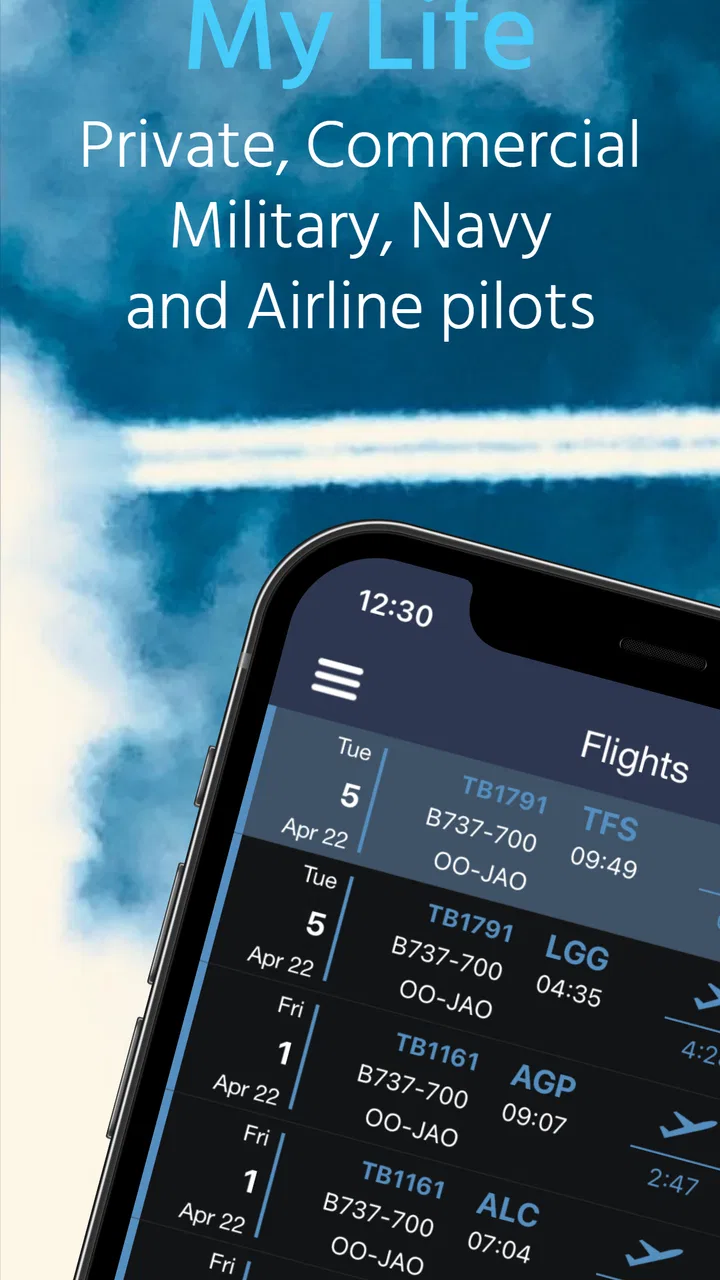
PILOTLOG - CrewLounge AERO is a digital flight-logbook app designed for pilots and aviation professionals. It helps you record flights, track aircraft and routes, manage duty information, monitor totals, and organize personal aviation records. The app is particularly useful for pilots who want a structured alternative to a paper logbook, with searchable entries and summaries available from a mobile device.
02Is PILOTLOG - CrewLounge AERO suitable for student pilots and professional crews?
Yes. The app can be useful for student pilots, private pilots, commercial pilots, and airline crew members, although the features you need may depend on your type of flying and subscription plan. Students can use it to build experience totals and maintain organized records, while professional pilots may appreciate more detailed tracking for aircraft, routes, schedules, and recurrent flight activity.
03Can I import existing flight records into PILOTLOG - CrewLounge AERO?
PILOTLOG - CrewLounge AERO is intended to help pilots move from traditional or other electronic logbooks into a centralized digital system. Import options may depend on the format of your existing data and the current version of the app, so it is important to check supported formats before starting. Always keep a backup of your original logbook before importing or editing records.
04Does PILOTLOG - CrewLounge AERO work offline?
The app is designed for situations where pilots may not always have a reliable internet connection, such as during travel or immediately after a flight. Core logbook information can generally be entered and reviewed on the device, while synchronization, account-related features, backups, or online services may require connectivity. After installing it, users should test offline access and confirm that recent entries synchronize correctly.
05Is PILOTLOG - CrewLounge AERO free to download, and are there in-app purchases?
The availability of free features, trial access, and premium tools can vary by platform, region, and the current pricing policy. Some basic functions may be available without payment, while advanced logbook management, synchronization, reporting, or professional aviation features may require a subscription or in-app purchase. Before downloading, review the Google Play or App Store listing to verify the latest costs and renewal terms.
Pros
- Detailed flight logging tailored to airline and private pilots.
- Tracks duty periods
- rest
- airports
- aircraft
- and crew information.
- Useful statistics help monitor flight time and operational experience.
- Supports offline access
- helpful when traveling without reliable internet.
- Data export options make it easier to keep personal records or share them.
Cons
- Many advanced features may require a paid subscription.
- The interface can feel dense for first-time users.
- Manual data entry may take time after complex multi-sector trips.
- Some functions depend on accurate airline or flight-data integration.
- Primarily useful to pilots
- offering little value to casual aviation fans.

PILOTLOG - CrewLounge AERO
Gallery